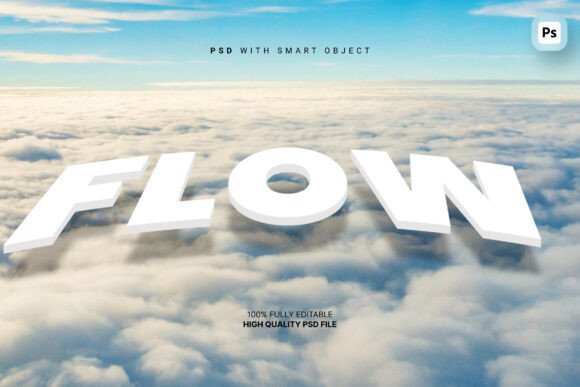
3D Floating Text Effect: Elevating Visual Design with Cinematic Flair
The 3D Floating Text Effect is a design asset that brings bold, dimensional typography into a vivid, cinematic setting. It positions editable letterforms within a scene featuring billowing white clouds and a deep blue sky, offering a powerful visual metaphor of openness and possibility. This effect is particularly suited for designers aiming to convey messages of inspiration, movement, or grandeur across a range of visual mediums.
At its core, this effect leverages smart object editing within Adobe Photoshop, allowing users to modify text content, color, and background elements without compromising quality. The result is a polished, high-resolution output (3000x3000px at 300 DPI) that maintains clarity and depth. Each file is organized with clearly labeled layers and folders, streamlining the customization process for both novice and experienced designers.
Why Designers Might Choose This Effect
Visual impact is a critical component in branding, social media, and cinematic design. The 3D Floating Text Effect delivers an immediate sense of scale and motion, making it a strong choice for:
- Motivational and Inspirational Content: Ideal for quotes that aim to evoke emotion and aspiration.
- Travel and Lifestyle Branding: Complements imagery and messaging that conveys freedom, exploration, and adventure.
- Social Media Headers and Event Banners: Offers a polished, cinematic look that stands out in digital feeds and promotional materials.
- Opening Titles and Cinematic Sequences: Adds dramatic depth to video introductions and title sequences.
Its versatility stems from the inclusion of 100 unique, editable backgrounds, allowing for customization across different themes and brand identities. Whether used for a travel agency’s campaign or a film’s opening credits, this effect helps create a strong first impression.
Key Benefits of the 3D Floating Text Effect
Several features make this design asset appealing for both personal and commercial use:
- Fast and Intuitive Editing: Thanks to smart object integration, users can update text and background elements without complex layer manipulation.
- High-Resolution Output: The 3000x3000px canvas at 300 DPI ensures print and digital quality without pixelation.
- Organized File Structure: Layered PSD files with labeled folders simplify navigation and editing, reducing production time.
- Versatile Background Options: With 100 editable backgrounds, users can tailor the effect to suit different moods and brand aesthetics.
- Scalable for Different Uses: From web banners to large-format prints, the resolution and flexibility support diverse applications.
Considerations and Tradeoffs
While the 3D Floating Text Effect offers many advantages, it’s important to evaluate its suitability based on your specific design goals:
- Software Dependency: Requires Adobe Photoshop to fully utilize smart object editing and layered customization. Users without access to Photoshop may find it less accessible.
- Scene Specificity: The cloud-and-sky motif may not align with all brand aesthetics or content types. For example, a tech startup may prefer a more minimalist or futuristic style.
- Preview Image Disclaimer: As noted, images used in the preview are not included in the package. Users should ensure they have appropriate rights to any additional imagery they incorporate.
- Limited Animation: While visually striking, this is a static image effect. Motion graphics or animated versions would require additional tools or assets.
When This Effect Excels
This 3D text effect shines in scenarios where visual storytelling and emotional resonance are key. If your project involves:
- Inspirational or motivational messaging
- Outdoor, travel, or adventure-themed branding
- Event promotion with a cinematic or dramatic tone
- Visual content requiring a strong focal point
…then this effect can serve as a powerful visual anchor. It’s especially effective in digital marketing, where eye-catching visuals can improve engagement and brand recall.
When Alternatives May Be Better
Despite its strengths, there are situations where alternative design assets might be more appropriate:
- Minimalist or Corporate Branding: A clean, flat design or subtle text effect may better align with professional or corporate aesthetics.
- Animated or Interactive Projects: For video or web animation, dynamic text plugins or After Effects templates may offer more flexibility.
- Non-Cinematic Themes: If your message is grounded, technical, or understated, a more subdued text effect could be more effective.
- Non-Adobe Workflows: If you're using alternative design tools like Canva, Figma, or Affinity Designer, you may need to convert or adapt the PSD files, which can add complexity.
Making the Right Choice for Your Project
Selecting the right text effect depends on more than just visual appeal. Consider these practical factors when evaluating the 3D Floating Text Effect:
- Project Tone: Does your message align with the cinematic, inspirational tone of the effect? If yes, this could enhance your visual communication.
- Design Workflow: Do you have access to Adobe Photoshop and experience working with smart objects and layered files? If not, consider whether the learning curve is worth the benefit.
- Customization Needs: Will the included 100 backgrounds and editable text meet your design requirements, or will you need to incorporate external assets?
- End Use: Is the output intended for digital use, print, or both? The high resolution supports both, but ensure your final format aligns with the intended display medium.
- Time Constraints: The organized file structure allows for quick editing, which can be a major advantage if you're working under tight deadlines.
Final Thoughts
The 3D Floating Text Effect is a well-structured, visually engaging design tool that can elevate a variety of creative projects. Its cinematic presentation, combined with practical editing features, makes it a valuable asset for designers seeking to convey inspiration, movement, and scale. However, like any design element, it should be selected based on how well it aligns with your message, audience, and workflow.
If your goal is to create bold, emotionally resonant visuals that stand out in a crowded digital space, this effect offers a compelling combination of style and functionality. But if your needs lean toward minimalism, animation, or cross-platform flexibility, exploring alternative text effects may be the better path.